Homework Review
- Exercise - Unusual InteractionsExercise - Unusual Interactions
The web is standardised
Most blogs look like blogs. Most news sites look like news sites. Most Ecommerce websites look like ecommerce websites.
What if we kept the standard interactions aside and... - Exercise - Realtime Web ExperienceExercise - Realtime Web Experience
Build something several people use at the same time
Create your own Firebase project and build a small realtime feature with it, live on your github.io URL. By using Realtime Database, you will ge... - Exercise - Sign in with GoogleExercise - Sign in with Google
Add Sign in with Google to your multiplayer experience
Take what you built in Exercise - Realtime Web Experience and make people sign in with Google before they can change anything. Same Fireb... - Exercise - Build with JevExercise - Build with Jev
Make something where a model decides, not writes
In Lecture 7 - What are LLMs? you tried the emoji picker: you type a sentence, and Jev picks from a fixed list. Now make your own. Your page as... - if you had trouble with this, some of today's lecture will help.
Follow up: how can a site check a password it never saves?
Real apps never store your password, only a hash of it. So how can the site can tell whether you typed the right password? Let's dig a bit deeper.
A hash function turns any text into a fixed-length string, like a fingerprint. Open this SHA-256 demo and type into the box. SHA-256 is one of the most common hash functions. Type Nidharna123!, then change the first letter to lowercase:
Nidharna123!  →  ef5a24be5e696b0670a070bb376616d2f4673d2b29d357dc78eac245221d21bc
nidharna123!  →  bd65af5ab064cfc8431fd8304209ef57d9d4fbc4a2e6dfdabc42a8648c85f43b
Some things to note:
- The same text always gives the same hash. Type
Nidharna123!again and you get exactly the same string. - One small change gives a completely different hash. Nothing about the second one looks like the first.
- You can't work backwards. There's no way to get
Nidharna123!from the hash, except by guessing passwords and hashing each one. - Two different pieces of text are, for all practical purposes, never going to have the same hash. This would be called a "collision"
So this is what a site does with your password:
- When you sign up, it hashes your password and saves only the hash.
- When you sign in, it hashes whatever you just typed and compares it with the saved hash.
- If you typed the right password, the hashes match, so it lets you in.
- If you typed anything else, the hashes don't match, so it doesn't.
The site sees your password for a moment while it hashes it, but it never stores it. If someone steals its database, they get hashes, not passwords.
Real sites go a bit further. They add some random text to each password before hashing it (called a salt), and use hash functions that are deliberately slow, so that guessing millions of passwords takes too long. With Sign in with Google, none of it is your problem: Google stores the hash, and your app never sees a password at all.
Hash functions do get broken
SHA-256's older sibling, SHA-1, was the standard for years. In February 2017, researchers at Google and CWI Amsterdam published two different PDF files with the same SHA-1 hash. Finding them took about nine quintillion attempts, roughly what one processor would do in 6,500 years. Once two different files can share a hash, the hash can't be trusted to tell them apart, so browsers, GitHub and others moved to SHA-256.
"Broken" here means that people found two inputs with the same hash, i.e. a collision. It doesn't mean anyone can work backwards from a hash to a password. But this is also a problem because many times a site publishes a hash for files like a software installer - if someone else was able to make a different file with malicious code with the same hash, the hash would no longer act as a security measure.
The Cloud is just someone else's computer
Everything you've made this semester runs on someone else's computer:
| What you made | Whose computer it runs on |
|---|---|
| Your github.io site | GitHub's (owned by Microsoft) |
| Your wall and your multiplayer experience | Google's, through Firebase |
| Your AI server | Vercel's, which rents its computers from Amazon |
| Sarvam | Sarvam's, in India |
| Jev | TypeSafe's, reached through Vercel's AI Gateway |
The cloud means renting computers from a company instead of owning them. What changes from one service to the next is how much of the work they do for you.
IaaS, PaaS, SaaS
| What you rent | What you look after | Examples | What you've used | |
|---|---|---|---|---|
| IaaS (infrastructure) | A computer in a data centre | Everything on it: the operating system, the server software, updates, security | AWS EC2, Google Compute Engine, DigitalOcean | Nothing yet |
| PaaS (platform) | A place to run your code | Just your code | Vercel, Render | Your api/ask.js from L9 |
| Backend as a service | A ready-made database, sign-in and storage | Your data and your rules | Firebase, Supabase | Your wall, and sign-in from L8 |
| SaaS (software) | A finished product | Nothing. You just use it | Gmail, Figma, Notion | Every day |
Some things to note:
- Each step down the table is less control and less work. Startups usually start near the bottom and only rent raw computers when they have to.
- The layers stack. Vercel is a PaaS that runs on Amazon's IaaS. Figma, a SaaS, runs on Amazon too.
- The more someone else runs, the more their limits become your limits. Firebase decides how many people can be connected at once, not you. That's a design constraint like any other.
- For the purpose of this class, we will mostly use Platforms and Backends as a service.
API keys
- Sign-in is for people. When your app makes a request to an API that is not free, the program uses an API Key instead of an ID and password.
- In the three kinds of proof from L8, a key is "something you know", for a program. Keys are usually not tied to a person - whoever has the key is should be able to access the service, as far as the API server is concerned. No second factor, no confirmation email.
- So keeping it secret is its only protection. The API server trusts the key, and it's your job to make sure only your app has it.
- Free API keys getting leaked or stolen is not too much of a big deal (worst someone can do is steal your free quota) but for a paid API key, you'll get a bill for the usage.
What happens to a key
An API key is a long, random string of letters and numbers. It works like an ID and a password at the same time: it says which account is asking, and proves that account is allowed to access the API.
From the dashboard to an answer, it goes through four steps:
- You generate it in the company's dashboard - today we will use Sarvam's. Their computer generates a random key. Many companies keep only a hashed copy of it (same idea as passwords in L8), which is why some dashboards, like OpenAI's, only show you a key once.
- You store it securely in
.envon your laptop and in Vercel's environment variables. Nowhere else. - Your app sends it with every request Without the API key, the API will not send you a response to your request.
- The API server checks it. The company's server looks the key up, checks it's still active and what it's allowed to do, counts the request against your limit, and only then answers. A missing or wrong key gets rejected - for eg. Sarvam answers a bad key with a
403and "Invalid or missing authentication credentials".
With a correct key, Sarvam sends back a 200 and the answer (trimmed):
{
  "choices": [
    {
      "message": {
        "role": "assistant",
        "content": "Bengaluru is the capital of Karnataka."
      },
      "finish_reason": "stop"
    }
  ],
  "model": "sarvam-105b-conversations",
  "usage": { "prompt_tokens": 12, "completion_tokens": 9, "total_tokens": 21 }
}
With a wrong key, it sends back a 403 and an error instead:
{
  "error": {
    "message": "Invalid or missing authentication credentials",
    "code": "invalid_api_key_error"
  }
}
Using API Keys
You can't commit your API key to your Github repo
Github Pages free tier requires your projects to be public. Bots scan GitHub for things that look like API keys and they will steal it in minutes. Git commit history keeps a copy even if you delete it with a new commit.
Even if you don't use a public repo, you can't put your API key into your project.
Anyone can View Source and find it and then start using your API billing.
You shouldn't paste your API key into a chat with your AI agent
Your chat history is sent to the AI company and can end up in your code. Most AI agents will tell you to "rotate" a key if they think you have sent them an API key in the chat - this means disable the key from your API dashboard, then generate a new one.
Then where can an API key be stored?
In a special type of file called .env (short for environment) on your laptop, ignored by Git using a file called .gitignore that tells Github to ignore some files in your project.
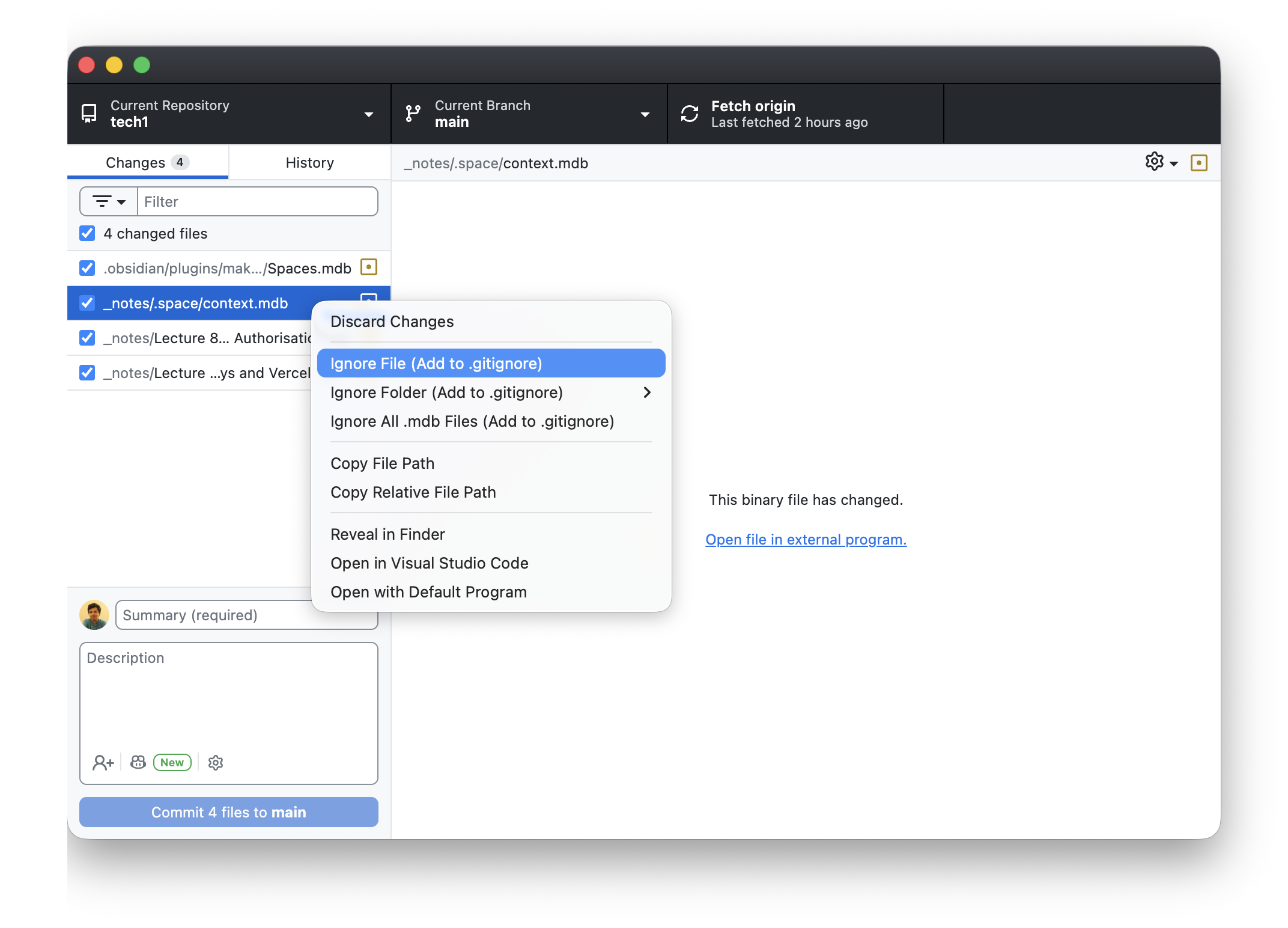
Save the value in the .env file using your text editor. This is one of the few things that you have to do manually instead of using an agent (for security reasons). Agents are told to specifically never read a .env directly. Tell your agent the key's name (SARVAM_API_KEY), never its value.
When you run the project locally, the code uses the .env saved only on your computer to access the API. When you deploy to Vercel, Vercel will not have the API key since it it's not in your repo, and you need to separately add the API key to Vercel in your project settings.
If it leaks, delete it and make a new one. Unlike your Google password, a key is quick to replace, so don't hesitate even if you are uncertain. Better safe than sorry.
Environments
An environment is a place where your app runs. The same code can run in a few different places - on your computer, on Github Pages, on Vercel, and each place has its own settings, including its own copy of the keys. That's where the name .env comes from.
Big companies have several environments, and new code moves through them one by one. When I worked at Microsoft, it went roughly like this:
- Local: your own laptop. Only you can see it.
- Dev: a shared server where the team's code comes together and gets tested. It usually has test data and test keys, so nothing real can break.
- Dogfood: the real product, used by people inside the company before anyone else. The name comes from "eating your own dog food", which means using what you make.
- Prod (production): the version real users get.
For your projects, Vercel gives you a smaller version of this:
- Local is your laptop, at
localhost. It reads keys from the.envfile. - Production is your real
your-project.vercel.app. It reads keys from Vercel's environment settings.
Where does the key go?
In lecture 6 your Firebase config sat in your HTML and that was fine. What's the difference?
| Firebase config | Model API key | |
|---|---|---|
| What it is | An address: which database to use | A password that spends your money |
| What protects you | Your database rules | Nothing, once someone has it |
| Safe in your page? | Yes | No |
So the key has to live somewhere visitors can't read: a server. Your page asks your server, and your server asks the model. Visitors never see the key or your system prompt.
   BROWSER                    VERCEL SERVER                 MODEL
   (user's device)              (holds the key)             (Sarvam's computer)

   types a question ───────▶  adds the system prompt ───▶ writes an answer
                              and the key                        │
   sees the answer  ◀──────── sends back JSON ◀────────────────┘
You don't have to rent a computer for this. On Vercel, a JavaScript file in a folder called api becomes server code: api/ask.js in your repo runs at your-project.vercel.app/api/ask. This is called a serverless function. There is a server, but Vercel looks after it.
The key goes in an environment variable, a value you type into Vercel's dashboard. Your server code can read it, and it never goes in your repo. The Anything API reads its key with process.env.ANTHROPIC_API_KEY.
On your laptop: .env
- The live site reads keys from Vercel. But you, and the AI agent you build with, need them on your laptop too, to test before you push.
- They go in a file called
.env: one key per line,NAME=value. Your server code reads it with the sameprocess.env.NAMEit uses on Vercel.
By the end of today, yours will look something like this. These keys are fake:
# Sarvam, from dashboard.sarvam.ai
SARVAM_API_KEY=sk_fake-sarvam-key-8f3k2m9x7q1w4e6r

# Jev, the class key from the class group
AI_GATEWAY_API_KEY=fake-gateway-key-2b7n5v1c9z3x8l4k
Class Activity: your own AI server
You'll make a page with one text box. It sends a question to your server, your server asks Sarvam, and the answer comes back. The key lives in .env on your laptop and in Vercel, and never reaches the browser or GitHub.
1. Get a free key
- Sign up at dashboard.sarvam.ai and create an API key. It starts with
sk_. - Every new account gets ₹100 of free credits, which don't expire. That's plenty for today. Don't add a payment method, so the worst case is running out of credits. You can't get a bill.
- Don't paste it into your code, the class group, or a chat with your AI agent. It goes into
.envin step 3.
We'll use the model sarvam-105b-conversations, made by Sarvam in Bengaluru and built for chat. Don't send anything private to it, yours or anyone else's.
2. Make a repo
Create a new repo from ask-me with Use this template, like you did with web-starter in Lecture 1 - Welcome to Tech1Lecture 1 - Welcome to Tech1
Welcome to Tech 1!
Some of you might remember me from your Ergonomics course last year
This time the course site is even better! Check gyanl.com/tech1
Our weekly slot is 2:15-4:15pm on Tues..., and clone it. This will be your first project on Vercel.
It's web-starter with a few things added:
.gitignore, already set up to keep.envout of GitHub..env.example, which lists the key this project needs, with a fake value.- An empty
apifolder, for the server code in step 4.
3. Keep the key in .env
- In your editor, copy
.env.exampleand name the copy.env. - Replace the fake value with your key. No quotes, no spaces around the
=:
SARVAM_API_KEY=paste-your-key-here
- Open GitHub Desktop.
.envshould not be in the list of changes. If it is, don't commit, and ask me.
Files starting with a dot are hidden in Finder. Press ⌘⇧. to see them, or ls -a in the Terminal.
4. Ask your agent for the server
Open the repo in your AI agent and give it this prompt. Fill in the blank first with your system prompt: what your AI is for and how it should answer.
Add a Vercel serverless function at api/ask.js.

- It takes a POST with JSON { "text": "..." } and returns JSON { "answer": "..." }.
- It calls Sarvam's chat completions API (https://api.sarvam.ai/v1/chat/completions) with the model sarvam-105b-conversations, sending the key in the api-subscription-key header.
- Use this system prompt, kept on the server: ______
- Read the key from process.env.SARVAM_API_KEY. It's in my .env file. Don't open or print .env.
- Turn away empty questions and anything over 500 characters, before calling Sarvam.
- Limit the answer to 1000 tokens with max_tokens.
- If Sarvam fails, return { "error": "..." } with a friendly message instead of crashing.
Before you accept it, read what it wrote and check:
- The key comes from
process.env.SARVAM_API_KEY, and doesn't appear anywhere in the file. - The model name and system prompt are at the top, where you can change them.
- There's an
ifthat rejects empty or long questions before thefetch. Every call costs something, even on the free tier. - The answer is dug out of
choices[0].message.content, the same path as the sample response earlier.
If something is missing, tell the agent what, in a sentence. You don't need to fix it yourself.
5. Ask your agent for the page
Then:
In index.html, inside <main>, add a form with one text input (max 500 characters),
an Ask button, and a paragraph below it for the answer.

In scripts.js, when the form is submitted:
- don't reload the page
- show "Thinking…" straight away
- POST the question to /api/ask
- show the answer, or the error if there is one

Use the existing styles. Don't call Sarvam from the browser.
Check:
- The
fetchgoes to/api/ask, your own server. No Sarvam address and no key inscripts.js. - "Thinking…" appears as soon as you press Ask. Waiting with no feedback feels broken, so this is a design decision as much as a code one.
You can't test this by opening index.html on its own, because there's no server running api/ask.js. Ask your agent to run it with vercel dev, which runs your api folder and reads .env on your laptop, like a small local Vercel.
The Terminal
The Terminal is an app where you control your computer by typing instead of clicking. Everything you do in Finder or File Explorer, you can also do here.
To open it:
- Mac: press ⌘ Space, type
Terminal, press Enter. - Windows: open the Start menu, type
Terminal(orPowerShellon older Windows), press Enter.
It's always "in" one folder at a time, like a Finder window. Try these, pressing Enter after each:
| What it does | Mac | Windows (PowerShell) |
|---|---|---|
| Which folder am I in? | pwd |
pwd |
| What's in this folder? | ls |
ls |
| Go into a folder | cd Documents |
cd Documents |
| Go back up one folder | cd .. |
cd .. |
| Open this folder in Finder / File Explorer | open . |
explorer . |
Try it: cd Documents, then ls, then cd GitHub, then ls again. You should see the repos you've cloned this semester.
Some things to note:
.means "this folder" and..means "the folder above".- Folder names with spaces need quotes:
cd "My Projects". - Press Tab to finish a name you've started typing. It saves typing and spelling mistakes.
- The up arrow brings back your last command.
- Hidden files like
.envdon't show with plainls. On a Mac usels -a; in PowerShell usels -Force.
This is also where your AI agent runs commands when it works on your project. When it asks permission to run something, it's asking to type a command here.
Install the Vercel CLI
A CLI (command-line interface) is a program you use by typing commands in the Terminal. GitHub Desktop and the Vercel website are graphical: you click. Git and Vercel also have CLI versions that do the same things with typed commands. Your AI agent mostly works through CLIs, which is why it can run Git and Vercel for you.
The Vercel CLI needs Node.js, the program that runs JavaScript outside the browser.
- Download and install the LTS version from nodejs.org.
- Open the Terminal and install the Vercel CLI (same command on Mac and Windows):
npm install -g vercel
npm is Node's app store for code. install -g vercel means install Vercel's CLI for the whole laptop, not just this project.
- Log in, and pick Continue with GitHub in the browser window that opens:
vercel login
- In the Terminal, go to your repo's folder and link it to your Vercel project:
cd Documents/GitHub/ask-me
vercel link
- Run it:
vercel dev
Open the address it prints, usually http://localhost:3000. That's your local environment, and it reads your key from .env. Press Ctrl+C in the Terminal to stop it.
Some things to note:
- If
npmsays "command not found", close the Terminal and open a new one after installing Node. - If
npm install -gsays "permission denied", ask your agent to fix it. Don't usesudounless you know why. - You can also ask your agent to do steps 2, 4 and 5 for you. You have to do
vercel loginyourself, because it signs in as you.
6. Put it on Vercel
- Commit and push.
- Import the repo into Vercel, following Help - Host on VercelHelp - Host on Vercel
What you'll end up with
Your site live at https://YOUR-PROJECT.vercel.app, updating by itself every time you push to GitHub.
GitHub Pages is fine for static sites. Vercel does the same job, and i.... - In the project, go to Settings → Environment Variables. Open
.envin your editor, copy everything, and paste it into the Key box. Vercel splits it into a name and a value. If it doesn't, addSARVAM_API_KEYby hand. Save. - Go to Deployments, click ⋯ on the latest one and Redeploy. A new variable only reaches deployments made after you add it.
Open your vercel.app URL and ask it something. Then check:
- View Source and search for your key. It isn't there.
- DevTools → Network: the request went to
/api/ask, not to Sarvam. - Your phone: same page, same server.
It won't work on github.io, in Simple Web Server, or from a double-clicked index.html. Those only serve files, so there's nothing to run api/ask.js.
Add the Jev key
- Jev from L7 needs a key too: the class key I'll share in the class group. Same rules, one more line.
- Add it to
.envon a new line, under the name used in Exercise - Build with JevExercise - Build with Jev
Make something where a model decides, not writes
In Lecture 7 - What are LLMs? you tried the emoji picker: you type a sentence, and Jev picks from a fixed list. Now make your own. Your page as...:
SARVAM_API_KEY=your-sarvam-key
AI_GATEWAY_API_KEY=the-class-key
- Paste the whole
.envinto Vercel again, the same way, and redeploy. - Ask your agent to add the
api/decide.jsserver from Exercise - Build with JevExercise - Build with Jev
Make something where a model decides, not writes
In Lecture 7 - What are LLMs? you tried the emoji picker: you type a sentence, and Jev picks from a fixed list. Now make your own. Your page as... to the same repo: "Add api/decide.js as described in this exercise. The key is in .env as AI_GATEWAY_API_KEY. Don't open or print .env." One project, two servers, two keys. - It's shared by the whole class and has a spending limit, so one call when someone presses a button, never on every keystroke. If you think it's leaked, tell me and I'll replace it.
- Add
AI_GATEWAY_API_KEYwith a fake value to.env.exampletoo, and commit it. That's how a teammate, or an agent, knows which keys the project needs.
Check it:
- Your repo on github.com has
.gitignoreand.env.example, and no.env. - Vercel's Environment Variables page lists both names.
- Both servers answer on your
vercel.appURL.
Your final project: start a startup
What a startup is
- A small team trying to find something people want, quickly, before the time or money runs out.
- Shaadi.com, Swiggy, Zerodha, Zepto. Each started as one small thing for one group of people.
- A product is only part of it. A startup also has to answer: who is it for, how do they hear about it, why do they sign up, why do they come back?
- That's why the final project is a product and a landing page.
Start small: the MVP
- MVP (minimum viable product): the smallest thing that tests whether people want it.
- Dropbox's first "product" was a video showing how it would work, and the sign-up list grew overnight. Back to Dropbox from L2.
- A landing page with a sign-up button is often the first MVP. If nobody signs up, you've saved months.
- For their project: what is the one flow that has to work? Everything else is "nice to have".
The brief
- Walk through Project - Final ProjectProject - Final Project
See also: Grading · Exercise - Final Project Ideas
Brief
In teams of up to 3, start a startup. You'll make two things:
A digital product that people sign in to and use. It can have AI...: a product people sign in to, a landing page that gets them to sign up, deployed on Vercel. An AI feature if it earns its place. - Everything so far is a part of it: pages (L1–L4), APIs (L5), a database (L6), sign-in (L8), keys and a server (today).
-
Teams form in L10. Until then, sharpen your Exercise - Final Project Ideas project ideas Note does not exist
This note is has not been published (yet).
.
Homework
- Finish your AI server with both keys, live on Vercel.
- Exercise - Keep Your Keys Out of GitExercise - Keep Your Keys Out of Git
API Keys
API keys are like passwords that let someone use your account with an API provider. Therefore, you have to store them carefully - they should never even be sent into an AI chat! (Why?)
I... -
Rewrite your best two Exercise - Final Project Ideas project ideas Note does not exist
This note is has not been published (yet).
as startups. Fill in "They'd sign up because ___" for each, and think about who you'd want to work with.
Reading: who makes the models
The models behind every AI feature, where they came from, and who owns them.
A short history
- 2017: Google researchers publish "Attention Is All You Need", describing the transformer. It's the T in GPT, and almost every model on this page is built on it.
- 2019: OpenAI's GPT-2. At first they held back the full model, saying it could be misused. The first time generated text felt worryingly real.
- 2020: GPT-3, with 175 billion parameters. Mostly the same method, just much bigger, and it could suddenly do tasks from a couple of examples.
- Nov 2022: ChatGPT. A model you'd already heard of, with a chat box and assistant training. About 100 million people used it within two months.
- 2023: GPT-4, the first Claude, and Meta's Llama. Models started passing professional exams, and anyone could download a strong model.
- 2024: GPT-4o talks and sees in real time, and OpenAI's o1 thinks before answering. One model for text, voice and images, and the start of reasoning models.
- Jan 2025: DeepSeek R1, an open-weights reasoning model from China, reportedly trained for a fraction of what others spent. Nvidia's share price fell about 17% in a day.
- 2025: Coding agents like Claude Code, Codex and Cursor's agent mode edit files and run commands for you. The tools you've been building with all semester.
- Feb 2026: Sarvam releases 30B and 105B as open weights, trained from scratch in India. A Bengaluru company competing on Indian languages.
- 2026: New frontier models from the big companies every few weeks, and new kinds like Jev. Anything in these notes with a version number is already out of date.
Sidenote: Which of these did you notice happening at the time? What's the first AI product you remember using?
Who makes them
Mostly closed, you can't download them:
- OpenAI (San Francisco): GPT, used in ChatGPT
- Anthropic (San Francisco): Claude
- Google DeepMind (London and California): Gemini. Its smaller Gemma models you can download.
- xAI (California): Grok
Open weights, you can download them:
- Meta (California): Llama
- Mistral (Paris): Mistral, for some of its models
- DeepSeek (Hangzhou): DeepSeek
- Alibaba (Hangzhou): Qwen
- Sarvam AI (Bengaluru): Sarvam
Open weights vs closed
That split is the big one.
| Closed (ChatGPT, Claude, Gemini) | Open weights (Llama, DeepSeek, Qwen, Sarvam) | |
|---|---|---|
| How you use it | Only through the company's app or API | Download it and run it yourself, or use any company that hosts it |
| How good | Usually the best available | Often a few months behind, sometimes level |
| Where your data goes | To the company | It can stay on your own computer |
| What you pay | Per token | For the computer it runs on |
| Can you change it? | Only with a prompt | You can train it further on your own data |
"Open weights" isn't quite the same as open source. You get the finished file of numbers, but usually not the training data or the code that made it, so you can use it and adjust it but not rebuild it. Small open models can run on a laptop with apps like LM Studio, with no internet and no key.